Time off
Your team requests time off in Kitchfly and you approve or decline it in one place. You can track each person's vacation and sick hour balance, and time off shows up on the schedule so you don't schedule someone who won't be there.
Included in both plans.
For your team: request time off
- Tap the ⏱ time clock button (on the POS or the kitchen display; on a kitchen display with PIN, everyone uses their own PIN).
- Tap 🌴 My time off. They see their balance (if they have one) and their requests.
- Tap + Request time off, choose the type (vacation, sick, personal or unpaid), the dates (or A few hours on one day, for example for an appointment) and, optionally, a reason.
- Tap Send request.
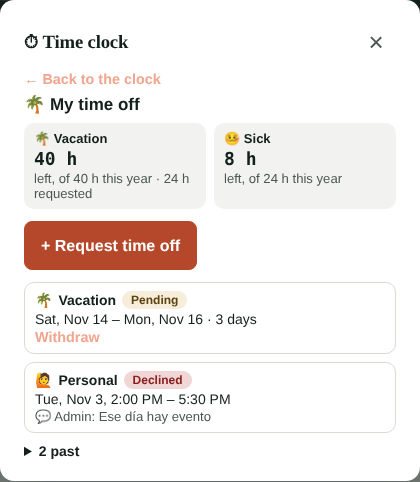
When you answer, the request changes to Approved or Declined with your message, and if they have an email they get a notice. They can withdraw a pending request, or an approved one that hasn't started yet.
For admins: approve and track balances
In Hours & labor → Time off:
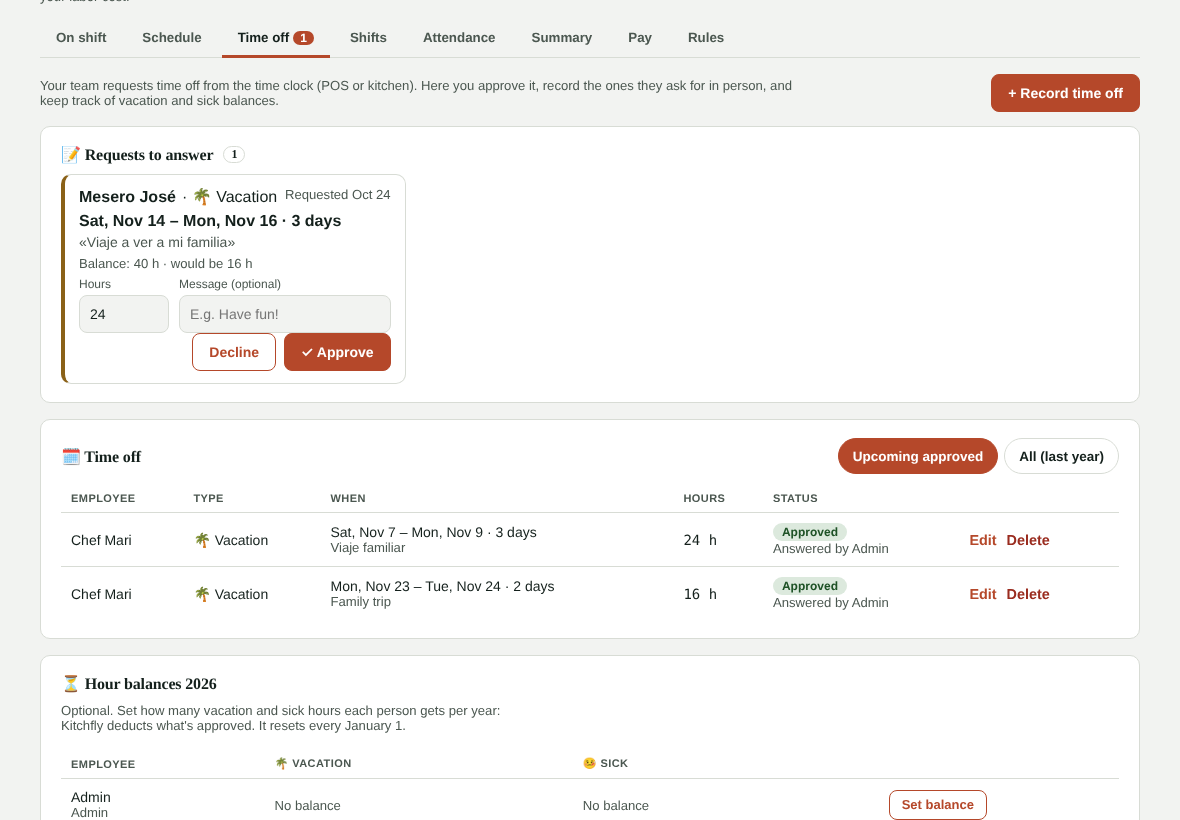
- Requests to answer: each with the dates, the reason and what their balance would be. You can adjust the hours it counts (a full day counts as 8 h; if they requested a weekend they don't work, lower it), write a message and tap Approve or Decline. If they already had shifts on the schedule on those dates, you can remove them when approving.
- + Record time off: for requests made in person or to record a sick day. It's approved right away.
- Time off: upcoming approved time off, or everything from the last year. You can edit or delete.
- Hour balances: tap Set balance to give someone, for example, 40 vacation hours and 24 sick hours per year. Kitchfly deducts what's approved and shows what's left. Balances reset every January 1. If you don't set a balance, it's simply not tracked.
Each new request shows up as an alert in your alerts bell. Your daily summary email tells you who's off tomorrow and how many requests are waiting.
On the schedule
On the weekly schedule time off shows in each person's cell: 🌴 if approved and ⏳ if still pending. If you add a shift that day, the schedule warns you at the top.
FAQ
Can past dates be requested? Employees can't; admins can record them (for example, if someone was out sick).
Is time off paid automatically? No. Kitchfly keeps the record and the balance; you handle pay in your payroll as usual.
What if someone works at several locations? Their time off shows on the schedule of every location they have access to.