Activity log
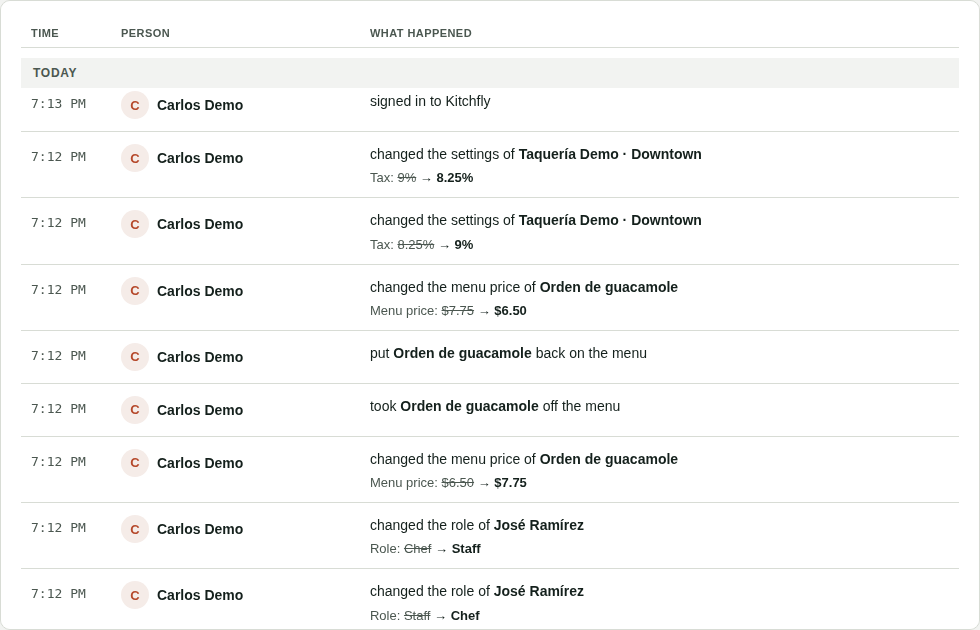
The Activity log tells you who changed what and when. If a price looks different this morning, an ingredient is missing or someone changed a setting, you see it here with the person's name and the time. Only the admin sees it, in Admin & settings → Activity log, and it's included in every plan.
What gets recorded
| Type | Examples |
|---|---|
| Prices & menu | A dish's menu price, an ingredient's purchase price, recipes and their ingredients, dishes published or taken off the menu, categories, modifiers and discounts. |
| Deletions | Everything that gets deleted (ingredients, recipes, tables, categories, suppliers…), with what it had before. |
| Team & access | People added or deactivated, role or pay changes, passwords and authorization PINs changed, and every time someone signs in to Kitchfly. |
| Settings | Tax, food cost target, printing, online ordering, table QR, overtime, alerts, tables, fixed costs and suppliers. |
| Inventory | Purchases, physical counts and losses. |
Each change shows the old value (crossed out) and the new one. Passwords and PINs are never shown: it only says they were changed.
POS sales and orders aren't recorded here: they're in Orders with their discounts, comps and refunds (see Orders and refunds). Neither are the stock movements from each sale.
Find a change
- Pick the type (Prices & menu, Deletions, Team & access, Settings or Inventory).
- Change the dates (it starts with the last 30 days).
- Filter by person.
- Type in Search the name of an ingredient, a dish or a person.
If a change has many fields, tap Show more changes to see them all.
Nobody can delete it
The log can't be edited or deleted from Kitchfly. It keeps the last year; older entries are removed automatically.
If you have several locations, each one has its own log: switch locations at the top of the menu to see another one.