Expiring (expiration dates)
Inventory → Expiring shows what's about to go bad so you can use it first, and lets you log what was thrown out. You don't have to write dates box by box: Kitchfly works them out from your purchases. It's included in all plans.
How it's calculated
- Each ingredient has a “Shelf life (days)” (from the day you buy it). For example: cilantro 5, sour cream 10, cheese 7.
- Each purchase gets its expiration date automatically: purchase date + shelf life. If the label says otherwise, change it when you log the purchase.
- First in, first out. Since inventory goes down with every sale, Kitchfly assumes what's left is the most recent stock, so it knows how much is left from each purchase and when it expires.
It's an estimate
The more often you count inventory and log waste, the more accurate it is. And if something looks or smells off, throw it out even if it shows as fine here.
Set each ingredient's shelf life
- In Ingredients, when you create or edit one, fill in Shelf life (days).
- Or faster: at the bottom of Expiring you'll see the ingredients in stock that don't have it yet; type the days and tap Save.
Without it, that ingredient isn't tracked.
When you log a purchase
In Purchases, when you pick the ingredient, the Expires field fills in by itself (today + shelf life). If the product label says a different date, change it. You can also fix the date of any purchase in the purchases table.
Use the Expiring screen
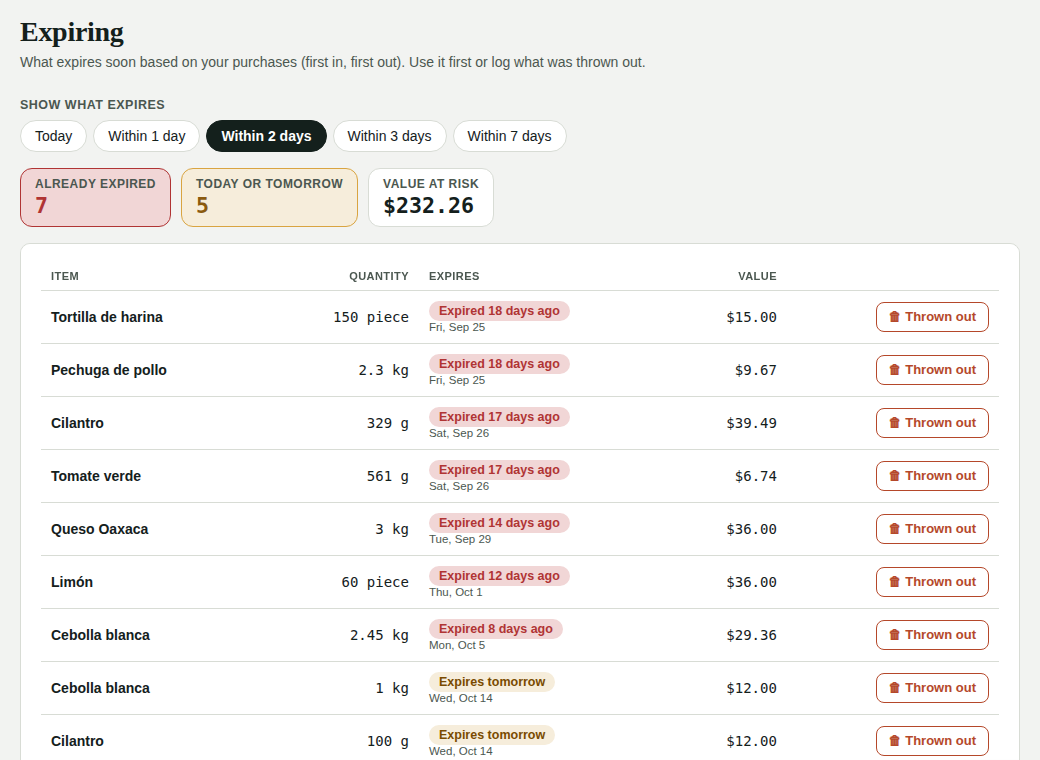
- Choose what to see: Today, Within 1 day, Within 2 days, Within 3 days or Within 7 days.
- At the top you see how much already expired, how much expires today or tomorrow and the value at risk.
- Each row shows how much is left, when it expires and what it's worth.
- If it was thrown out, tap Thrown out, confirm the quantity and Log it: it comes off inventory, goes to Waste with the reason Expired, and its cost shows up in your profit & loss.
On the Pro plan, you also see what you saved when closing the prep list (sauces, rice, marinades), dated by each prep item's shelf life. That is thrown out from the prep list close.
In the kitchen
The kitchen display shows a 📅 Expiring button when something expires today or tomorrow (it's also in the ⋮ menu). The chef sees the same list and can log what was thrown out.
The morning alert
Every morning (from 7 a.m.) you get a summary in the bell of what expires in the next few days. If something expires today or tomorrow, you also get an email. You can turn it off or change the days in Settings → Alerts → Expiring soon.
Make the most of it
What expires tomorrow is your daily special. And if you throw out the same thing every week, buy less or more often.