Loyalty program
Daily operations → Loyalty program rewards customers who come back. You turn it on and decide how customers earn, what the reward is and where it works. It's included in every plan.
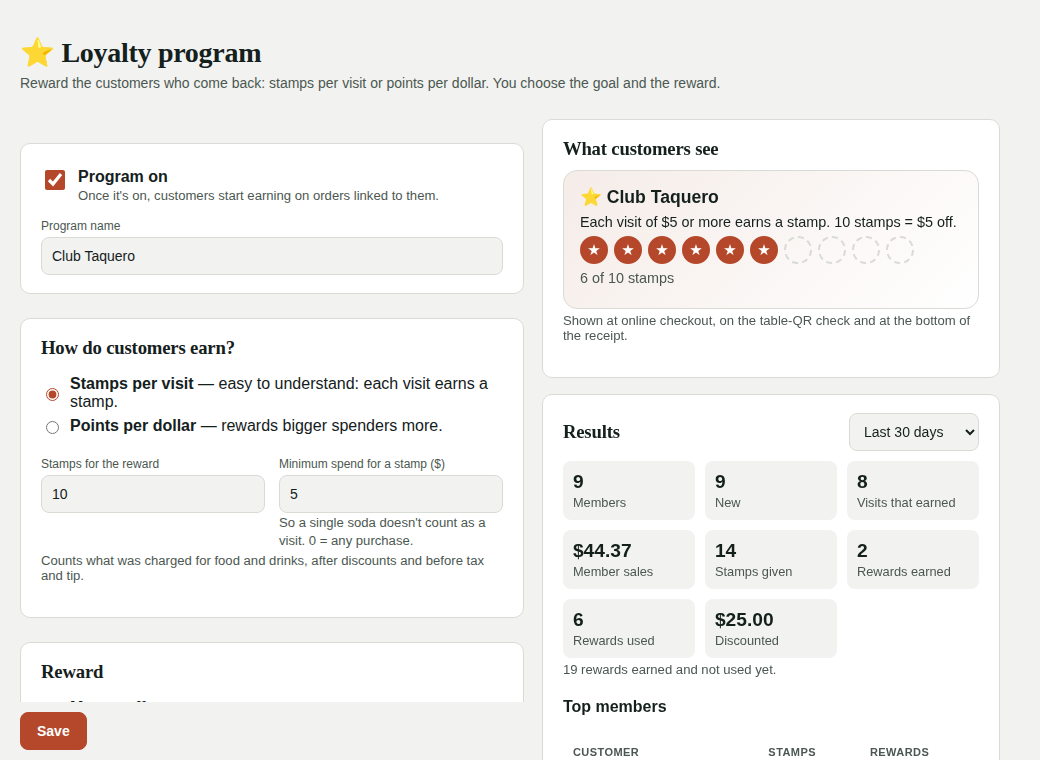
Turn it on
- Turn on Program on and, if you want, give it a name (e.g. “Taco Club”).
- Choose how customers earn:
- Stamps per visit: each visit earns a stamp; at the goal (e.g. 10 stamps) they earn the reward. Set a minimum spend so a single soda doesn't count as a visit.
- Points per dollar: e.g. 1 point per $1; at the goal (e.g. 100 points) they earn the reward. Rewards bigger spenders more.
- Choose the reward: money off (e.g. $5) or a free dish from a list you choose (the discount is that dish's price).
- Choose where it works: POS, online orders, table QR and kiosk.
- Save. On the right you see what your customers will see.
Earning is based on what was charged for food and drinks after discounts, before tax and tip. Stamps or points are added when the order is paid.
If you switch between stamps and points
Your customers' progress resets to zero, but rewards they already earned are kept. If you lower the goal, progress that already reaches it becomes a reward.
At the POS
The ticket shows ⭐ [your program] customer:
- Enter the customer's phone and tap Search.
- If they're a member, you see their name and progress: tap Link to order. If they're new, enter their name (and email if they want reward alerts) and tap Sign up and link.
- If they have a reward, tap 🎁 Use reward: it's applied as a discount on the order. If the reward is a dish, that dish must be on the order.
- When you close the order, it earns automatically; the printed receipt shows what they earned and their card progress.
Rewards are used before payment, and the order can't have another discount. If you remove the reward or cancel the order, the reward goes back to the customer.
Seated reservations already have their customer linked, so those orders earn too.
Online orders
At checkout, once the customer enters their email and phone, they see their card. If they have a reward, they check Use my reward and the discount shows in the total. The order earns when it's sent to the kitchen. If the order is rejected or expires, the reward goes back.
To use a reward online, the email and phone must match their card.
Table QR
Under My check, the customer enters their phone to earn (if they're new, also their name). If they have a reward, they tap Use my reward and confirm their email; the discount is applied to the check before paying. They also earn if they leave their email to get the receipt.
Self-service kiosk
At the kiosk, customers enter their phone in Your order and earn when the order is paid (by card at the kiosk or at the counter). Rewards are redeemed at the counter: the cashier applies them on the ticket.
What customers are told
- The receipt, the table-QR receipt and the “your order is ready” email show their card progress.
- If you turn on Email customers, they get an email when they earn a reward (only if they have an email).
Results and customers
On the right you see, for the period you choose: members, new members, visits that earned, member sales, stamps or points given, rewards earned and used, and how much was discounted. Below, your top members.
In Customers, each customer's record shows their card and history (earned, used reward, reward returned, refund, adjustment). There you can adjust stamps, points or rewards by hand, with a reason (e.g. “forgot to give their phone”).
Refunds
If you refund a whole order, the stamps or points earned with it are removed.