Price simulator
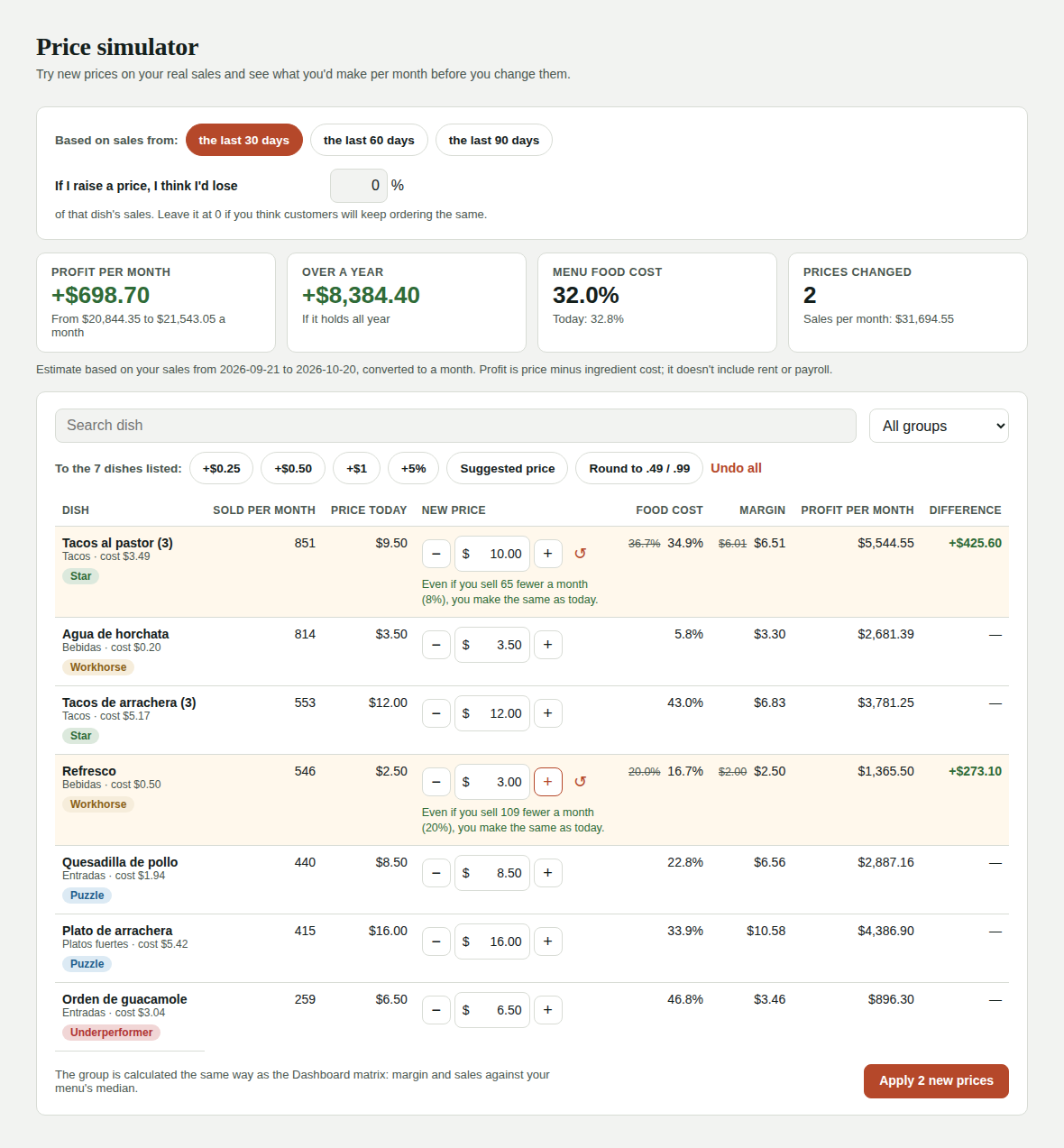
The simulator lets you try new prices on your real sales and see what you'd make per month before you change them. For example: "if I raise al pastor tacos $0.50, how much more do I make a month?".
Find it in Menu & products → Price simulator, or from Menu classification on the Dashboard with Simulate prices →. Only admins see it.
How to use it
- Pick the sales period: the last 30, 60 or 90 days. Kitchfly converts those sales to one month.
- Change the price of one or more dishes: type it or use − and + (25 cents at a time). ↺ puts it back to today's price.
- Check the result at the top:
- Profit per month: how much more (or less) you'd make, and today's total versus the new one.
- Over a year: the same difference times 12 months.
- Menu food cost: your overall food cost with the new prices.
- If you like it, tap Apply new prices and confirm.
What if I lose sales when I raise a price?
In If I raise a price, I think I'd lose __ %, enter how many sales you think you'd lose on the dishes that go up. For example, with 5% the simulator assumes you sell 5% fewer of those dishes.
Under the new price you'll see, in green, how many sales a month you can lose and still make the same as today. If you think you'll lose fewer than that, the increase pays off.
Change several prices at once
The buttons above the table apply to the dishes in the list. Use search or the group filter to choose which ones:
| Button | What it does |
|---|---|
| +$0.25 / +$0.50 / +$1 | Adds that amount to the price. |
| +5% | Raises the price 5%. |
| Suggested price | Raises dishes below their suggested price up to it. |
| Round to .49 / .99 | Rounds the prices you changed up. |
| Undo all | Puts everything back to today's price. |
Example
Filter by Workhorse (they sell a lot but leave little), tap +$0.50 and then Round. You'll see right away what you'd make by adjusting the dishes you sell most.
Each dish's group
Under the name you'll see its menu engineering group (Star, Workhorse, Puzzle or Underperformer), calculated the same way as the Dashboard matrix: margin and sales against your menu's median. If the new price changes its group, you'll see an arrow with the new group.
Applying the prices
When you tap Apply new prices you'll see the list of changes to confirm. Prices change from that moment in the POS, online ordering and table QR. Orders that are already open keep their price.
Keep in mind
- It's an estimate: it assumes you sell the same as in the period, minus the % you enter.
- Profit is price minus ingredient cost. It doesn't include rent, payroll or other fixed costs.
- If your restaurant has fewer days of sales than the period, the month is calculated from the days it has.
- The more up to date your purchases are, the more accurate each dish's cost is.