Record purchases
Record what you buy from your suppliers. Each purchase does three things at once:
- Adds stock to the ingredient.
- Updates the ingredient's price with what you actually paid, so every recipe cost updates.
- Keeps a history by supplier and invoice (and sends it to QuickBooks if you connected it).
Add your suppliers first
In Suppliers, fill Name and Contact (phone, email...) and click Save supplier.
Record a purchase
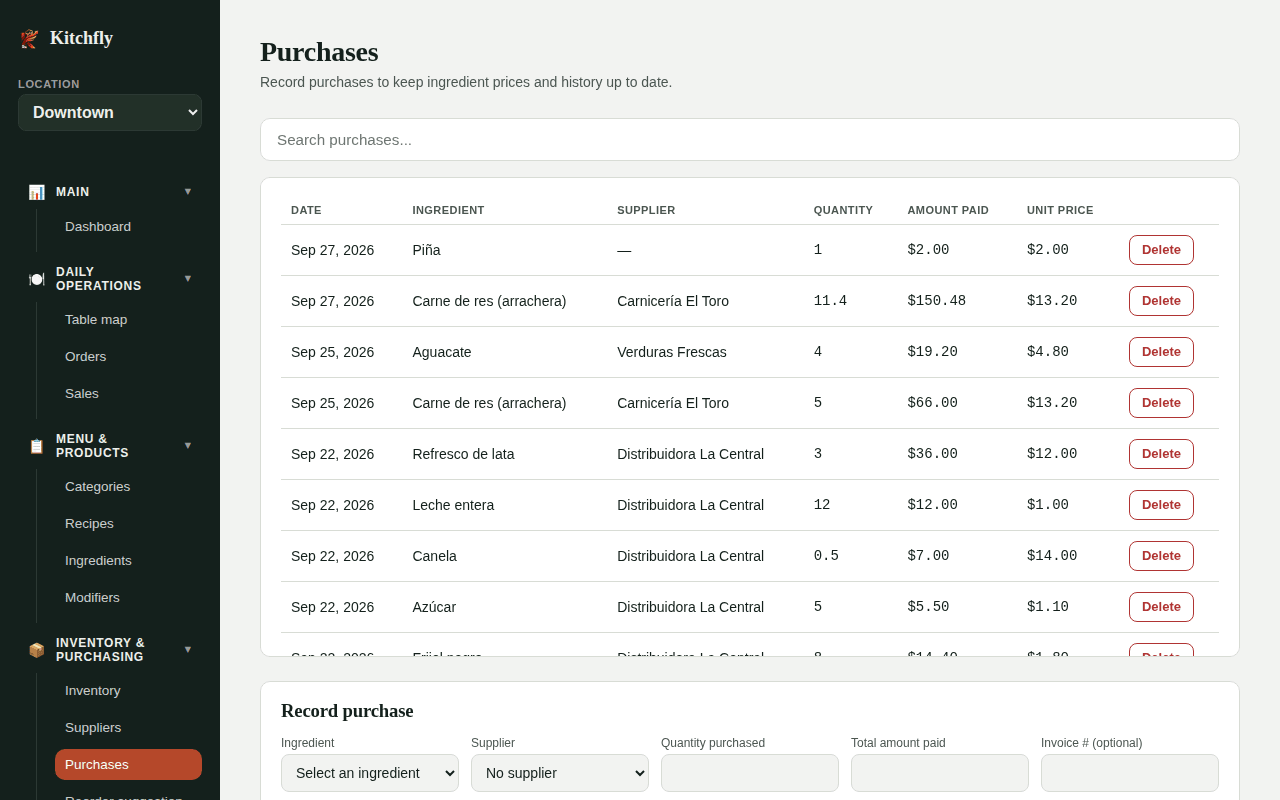
Go to Purchases → Record purchase:
| Field | Example |
|---|---|
| Ingredient | Avocado |
| Supplier | Central Produce (or No supplier) |
| Quantity purchased | 10 — in the ingredient's purchase unit (kg, box…) |
| Total amount paid | 45.00 — the total for that line, not the unit price |
| Invoice # (optional) | F-1234 |
| Expires | Filled in automatically if the ingredient has a Shelf life; change it if the label says otherwise. See Expiring |
Click Save purchase. Kitchfly shows Purchase saved. Ingredient price updated to $….
One invoice, several ingredients
Record one line per ingredient with the same Invoice #. In QuickBooks they are grouped into a single bill for that supplier.
Watch the units
If the ingredient is bought by kg, enter kilos (10), not grams (10000). Kitchfly converts to the use unit with the ingredient's conversion factor.
Still need help?Use the Support button inside Kitchfly (how) or email [email protected] with your restaurant name and a screenshot. We'll get back to you as soon as possible.