Daily summary email
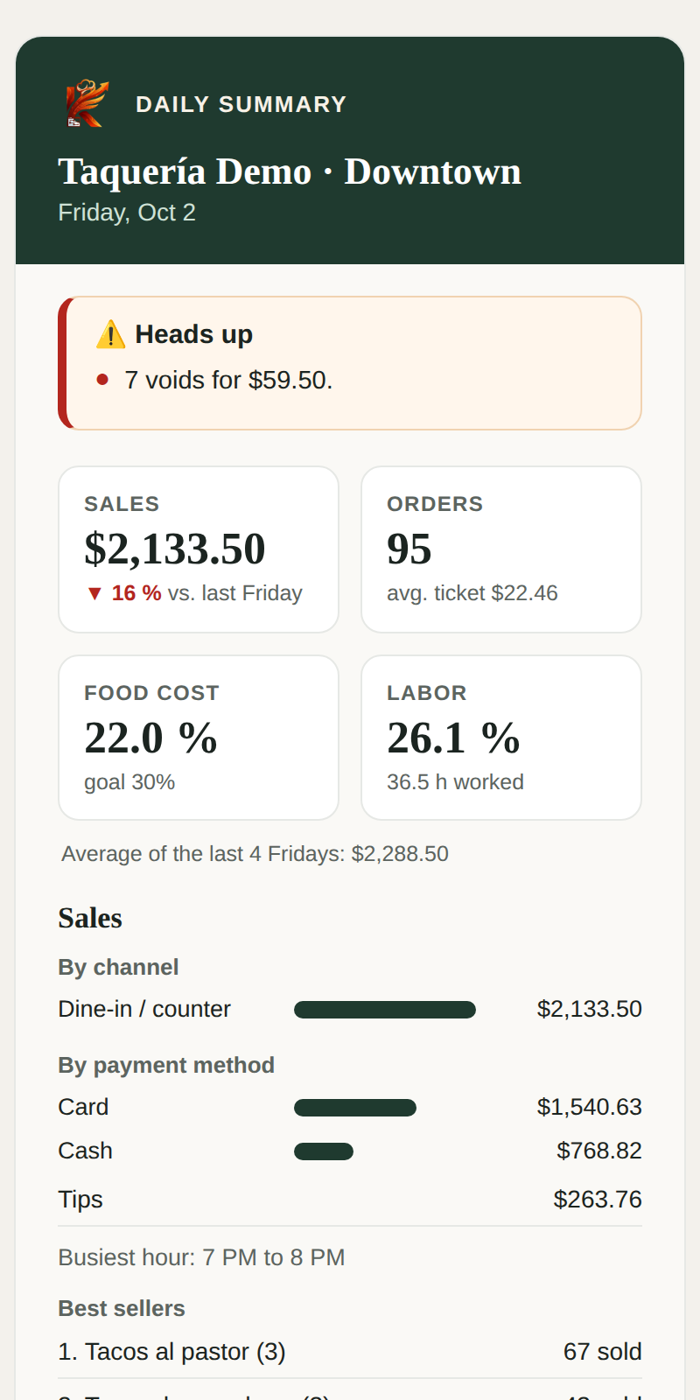
When you close for the day you get an email with how it went, without opening Kitchfly. If something important happened (a cash drawer shortage, a lot of voids, a high cost), it comes first, in the Heads up box.
What's in it
- The day in 4 numbers: sales (vs. the same day last week and the average of the last 4), orders and average ticket, food cost and labor.
- Sales: by channel (dine-in, online, table QR), by payment method, tips, busiest hour, best sellers and slowest movers.
- Cash drawer: the close, expected vs. counted, and who opened and closed.
- Money that went out: discounts, comps and voids (with who approved them), refunds and waste.
- Operations: 86'd dishes, kitchen times, the prep list and reservations.
- For tomorrow: reservations, ingredients below minimum (with a link to Suggested order) and what's left to prep ahead.
- Today's alerts: the smart alerts that went off.
The subject line tells you without opening it: Downtown · Fri, Oct 2: $2,133.50 (▼ 16%) · 1 alert.
When it arrives
It goes out as soon as the last cash drawer is closed after the time you choose (6:00 p.m. by default). If you close a drawer after lunch and open again for dinner, it waits for the last close.
If nobody closes a drawer, it arrives no later than the cutoff time (11:30 p.m. by default). If you close late at night, set a cutoff like 1:00 a.m.
It isn't sent on days with no sales, unless you turn that on.
Set it up
In Settings → Daily summary:
- Choose the times.
- Who gets it: you and up to 8 more emails (partner, manager, accountant). Each one gets it in their language.
- Sections to include. The 4 numbers and the Heads up notices are always included.
- Tap Save changes.
Preview shows the email for any day, on phone or desktop and in both languages. Send me a test sends you yesterday's.
Anyone can unsubscribe with the link at the bottom of the email. Below the settings you'll see the recent sends.
Pro plan
- Weekly summary: on Monday at 8:00 a.m. you get the full week vs. the previous one, with sales by day, best sellers, costs, waste and cash drawer differences.
- All locations in one email: turn on One email with all locations in each location you want included. It arrives when they've all closed, with a table of each one and its notices.