API & webhooks
Connect Kitchfly to other tools: Zapier, Make, Google Sheets, your accountant or a developer.
- An API key lets another tool read your data (sales, orders, menu…).
- A webhook makes Kitchfly notify another tool the moment something happens (a sale is closed, an order comes in, a customer opts in to marketing…).
It's included in both the Basic and Pro plans. Only an admin can create keys and webhooks, and each location has its own.
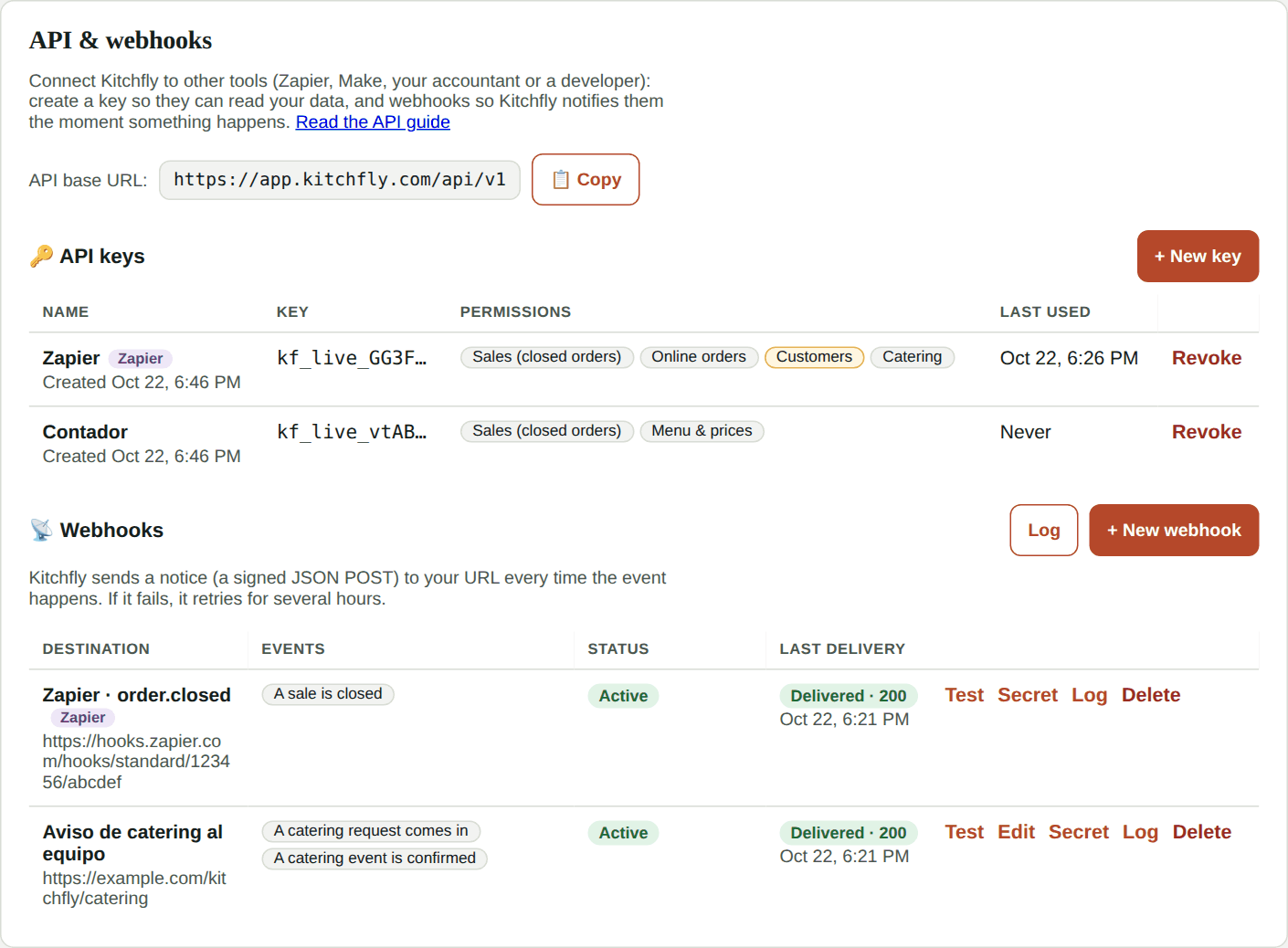
Create a key
- Go to Settings → Integrations → API & webhooks.
- Tap New key, give it a name (for example "Zapier" or "My accountant") and check what it can see. The Customers and Team shifts permissions include personal data: only grant them when they're really needed.
- Tap Create key and copy it. This is the only time you'll see it in full.
Treat your key like a password
Anyone who has it can read the data it allows. If you think someone else has it, tap Revoke and create a new one. For now keys are read-only: they can't change anything in Kitchfly.
Create a webhook
- On the same screen, tap New webhook.
- Paste the URL the other tool gave you (it must start with
https://) and choose when to notify. - Save. Kitchfly shows you the signing secret (whoever builds the receiving end needs it).
- Tap Test to send a notice with sample data and check that it arrived.
Log shows the latest notices (kept for 30 days): whether they arrived, the response, and what was sent. If one fails, Kitchfly retries it after 1, 5, 30, 120 and 360 minutes. If a webhook fails 25 times in a row, it's turned off and you get an alert.
Webhooks created by Zapier show up here too, tagged Zapier. If you revoke Zapier's key, they're deleted as well.
Events
| Event | Sent when | Permission |
|---|---|---|
order.closed |
A sale is closed (paid) | Sales |
online_order.created |
An online order comes in | Online orders |
customer.created |
A new customer is added | Customers |
customer.opted_in |
A customer opts in to marketing | Customers |
catering.requested |
A catering request comes in | Catering |
catering.confirmed |
A catering event is confirmed | Catering |
inventory.low_stock |
An ingredient drops below its minimum | Inventory |
shift.ended |
Someone clocks out on the time clock | Team shifts |
For developers
Authentication
Base URL: https://app.kitchfly.com/api/v1. Send the key in the X-API-Key header (or Authorization: Bearer kf_live_…). Each key belongs to one location and only sees what its permissions allow. Limit: 120 requests per minute per key (429 above that).
curl https://app.kitchfly.com/api/v1/me -H "X-API-Key: kf_live_..."
Endpoints
All responses are JSON in English, amounts in US dollars, dates in ISO 8601. Lists are newest first; use limit (1–100, default 25) and since (ISO date).
| Method | Path | Permission | Returns |
|---|---|---|---|
| GET | /me |
— | Location, key name, permissions and the events it can subscribe to |
| GET | /orders |
orders:read |
Closed orders (sales) with items, tax, tip and payments |
| GET | /online-orders |
online_orders:read |
Online orders with customer contact |
| GET | /customers |
customers:read |
Customers; filter with email, phone or accepts_marketing |
| GET | /catering/events |
catering:read |
Catering requests and quotes; filter with status |
| GET | /inventory/low-stock |
inventory:read |
Ingredients below their minimum |
| GET | /menu |
menu:read |
Active items with category and price |
| GET | /shifts |
labor:read |
Finished time-clock shifts with hours |
| GET | /events |
— | Event list and whether this key can use each one |
| GET | /events/{event}/sample |
event's permission | Up to 3 recent real examples (or a sample) |
| POST | /hooks |
event's permission | Subscribe { "url", "event" } → { "id", "secret" } |
| DELETE | /hooks/{id} |
— | Unsubscribe |
POST /hooks and DELETE /hooks/{id} follow the REST hooks pattern that Zapier uses.
Webhook payload
{
  "id": "636b5a31-ecff-442a-8eeb-189768b308a7",
  "event": "order.closed",
  "created_at": "2026-10-22T23:45:10Z",
  "restaurant": { "id": "…", "name": "Taquería Demo", "location": "Downtown" },
  "data": { "id": "…", "number": 12, "total": 30.85, "items": [ … ] }
}
data has the same shape as the matching API endpoint. Headers: X-Kitchfly-Event, X-Kitchfly-Delivery (unique per delivery, use it to ignore duplicates) and X-Kitchfly-Signature.
Reply with any 2xx within 10 seconds. Reply 410 Gone to cancel a subscription. Anything else is retried.
Verify the signature
X-Kitchfly-Signature: t=<unix time>,v1=<signature>, where the signature is the hex HMAC-SHA256 of "<t>." + raw body with your webhook's secret.
import hashlib, hmac, time

def is_from_kitchfly(secret: str, header: str, body: bytes) -> bool:
    parts = dict(p.split("=", 1) for p in header.split(","))
    signed = f"{parts['t']}.".encode() + body
    expected = hmac.new(secret.encode(), signed, hashlib.sha256).hexdigest()
    fresh = abs(time.time() - int(parts["t"])) < 300
    return fresh and hmac.compare_digest(expected, parts["v1"])
const crypto = require('crypto')
function isFromKitchfly(secret, header, rawBody) {
  const parts = Object.fromEntries(header.split(',').map((p) => p.split('=')))
  const expected = crypto.createHmac('sha256', secret).update(`${parts.t}.${rawBody}`).digest('hex')
  const fresh = Math.abs(Date.now() / 1000 - Number(parts.t)) < 300
  return fresh && crypto.timingSafeEqual(Buffer.from(expected), Buffer.from(parts.v1))
}
Errors
| Code | Meaning |
|---|---|
| 401 | Missing, invalid or revoked key |
| 402 | The Kitchfly account isn't active |
| 403 | The key doesn't have the permission |
| 429 | Too many requests |
FAQ
Can I connect Kitchfly to Google Sheets without coding? Yes, with Zapier or Make: create a key for them and pick the event you want to send to your sheet. See the recipes in Kitchfly + Zapier.
Is card data ever sent? No. Card numbers never leave Kitchfly; at most, the brand and last 4 digits.
How many keys and webhooks can I have? Up to 20 active keys and 100 webhooks per location.